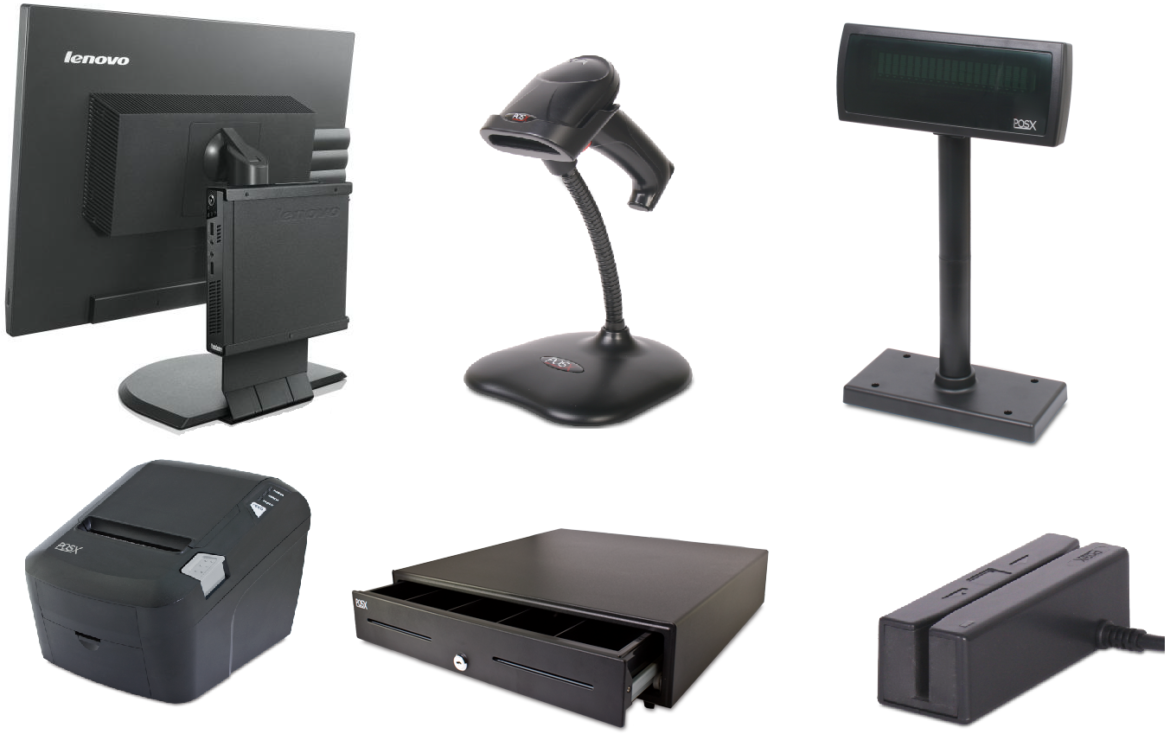
Point of Sale (POS) systems are central to the operations of retail stores, restaurants, and hospitality businesses. While the software handles sales, inventory, and reporting, POS peripherals are equally important for ensuring smooth transactions and operational efficiency. These peripherals, including barcode scanners, receipt printers, payment terminals, and customer-facing displays, are used continuously throughout the day and can experience wear and tear. Regular maintenance of POS peripherals is essential to prevent downtime, ensure accuracy, and extend the lifespan of the equipment.
Importance of Maintaining POS Peripherals
Maintaining your POS peripherals is not just about avoiding breakdowns; it also ensures that your business operates efficiently and provides a positive customer experience. Malfunctioning devices can cause delays at checkout, incorrect billing, or even lost sales. A structured maintenance routine can reduce operational disruptions and prevent expensive replacements. A reliable POS Peripherals maintenance plan can also improve the performance of your POS system by keeping all devices responsive and accurate, which is especially important in high-traffic retail and hospitality environments.
Routine Cleaning and Dust Management
Dust and debris are major contributors to peripheral malfunctions. Barcode scanners, touchscreen terminals, and receipt printers should be cleaned regularly to maintain their performance. Use soft, lint-free cloths and appropriate cleaning solutions to wipe down surfaces, screens, and keypads. For printers, ensure that paper paths and rollers are free of dust and residue. Avoid using harsh chemicals or abrasive materials that can damage sensitive components. For devices exposed to heavy use or high-traffic areas, daily cleaning may be necessary, while low-traffic devices can be cleaned weekly.
Inspecting Cables and Connections
Loose or damaged cables can lead to peripheral failures, intermittent connectivity, or system errors. Regularly inspect all cables, including power cords, USB, Ethernet, and peripheral-specific connections, to ensure they are secure and free from fraying or other damage. Replacing worn or faulty cables immediately can prevent unexpected downtime and protect your equipment from electrical damage. Additionally, avoid placing cables in high-traffic areas where they may be stepped on, pulled, or bent excessively. Proper cable management helps extend the life of your POS peripherals.
Updating Firmware and Software
Many POS peripherals rely on firmware or software to operate correctly and communicate with the main POS system. Regular updates provided by manufacturers can improve device performance, add new features, and fix known bugs. Failing to update devices can lead to compatibility issues, slow performance, or security vulnerabilities. Establish a schedule for checking and applying updates to ensure that all peripherals remain secure, efficient, and fully functional.
Testing Device Functionality
Routine testing of POS peripherals ensures they are operating correctly and reduces the risk of failures during peak business hours. Barcode scanners should be tested for accurate code reading, receipt printers should produce clear and legible receipts, and payment terminals should process transactions reliably. For customer-facing devices, such as displays or touchscreen interfaces, verify responsiveness and clarity. Conducting periodic functionality checks allows for early detection of issues and reduces the risk of disruptions during active service periods.
Environmental Considerations
The environment in which POS peripherals operate can significantly impact their lifespan. Avoid placing devices in areas exposed to excessive heat, moisture, or direct sunlight. Proper ventilation around devices, especially printers and terminals, prevents overheating. In restaurants or kitchens, consider using splash guards or protective covers to shield peripherals from grease, liquids, or food particles. Keeping peripherals in a controlled and safe environment ensures consistent performance and reduces maintenance needs.
Employee Training and Handling
Proper handling of POS peripherals by staff is a crucial aspect of maintenance. Train employees on correct usage, including how to operate touchscreens, load paper into printers, and handle scanners. Encourage gentle use to prevent unnecessary wear and educate staff on reporting minor issues before they escalate into significant problems. Proper training reduces accidental damage, decreases repair costs, and ensures that devices operate smoothly for longer periods.
Preventive Maintenance Schedule
Creating a preventive maintenance schedule for POS peripherals helps streamline maintenance tasks and ensures nothing is overlooked. Schedule routine inspections, cleaning, cable checks, software updates, and functionality tests. Documenting maintenance activities can help track the performance and history of each device, making it easier to anticipate replacements or repairs. A well-organized preventive maintenance plan minimizes unexpected downtime and extends the life of your POS peripherals.
Professional Servicing
While daily maintenance is essential, professional servicing is equally important. Manufacturers and certified service providers can perform detailed diagnostics, replace worn components, and provide technical support for complex issues. Investing in periodic professional maintenance ensures that peripherals are maintained according to industry standards and can prevent costly failures.
Conclusion
Proper maintenance of POS peripherals is vital for ensuring operational efficiency, accuracy, and customer satisfaction in retail and hospitality businesses. Regular cleaning, cable inspections, firmware updates, device testing, environmental protection, and employee training all contribute to prolonging the life of peripherals and reducing downtime. Combining daily care with preventive maintenance schedules and professional servicing ensures that your POS peripherals continue to perform reliably. By prioritizing the upkeep of these devices, businesses can maintain smooth operations, improve efficiency, and enhance the overall customer experience.